Menu
 

BestReviews is reader-supported and may earn an affiliate commission. Details

Best WiFi Extenders

Updated March 2025
BEST OF THE BEST
TP-Link RE650 AC2600 Wi-Fi Range Extender
BEST OF THE BEST
TP-Link
RE650 AC2600 Wi-Fi Range Extender
Easiest to Use
If you need to eliminate a small- to mid-sized home's WiFi blind spots, consider this decently priced option.
Check Price Check Price

Pros and Cons

PROS
  • Reliably covers a large area.
  • Optimized for 4K content and smooth gaming.
  • Simple setup.
  • Consistently speedy WiFi speeds.
  • Beamforming where a strong signal is needed the most.
CONS
  • This relatively chunky socket-based style might be a dealbreaker for some.
BEST BANG FOR THE BUCK
Google Nest WiFi
BEST BANG FOR THE BUCK
Google
Nest WiFi
Feature-Packed
This is the perfect solution if you already have a smart home that utilizes Google technologies to manage your devices.
Check Price Check Price

Pros and Cons

PROS
  • Stylish.
  • Each WiFi point is also a smart speaker with Google Assistant.
  • Effortlessly handles 4K video and multiple devices.
  • Designed with security in mind.
  • Automatic updates.
CONS
  • Some won't like the idea of multiple smart speakers in their home.
TP-Link Deco AX3000 Wi-Fi 6 Mesh System (Deco X55)
TP-Link
Deco AX3000 Wi-Fi 6 Mesh System (Deco X55)
Broad Coverage
This mesh system features three units for a broad coverage zone of 6,500 square feet.
Check Price Check Price

Pros and Cons

PROS
  • It can support up to 150 devices connected simultaneously, and each unit has three gigabit Ethernet ports for fast and reliable wired connections.
  • The AI-driven system learns your usage patterns to prioritize your most used devices.
  • The Deco app makes it easy to set it up and manage security preferences.
CONS
  • The web portal isn't very user-friendly or helpful compared to the app.
TP-Link  AX1800 Wi-Fi 6 Range Extender
TP-Link
AX1800 Wi-Fi 6 Range Extender
Best for Large Homes
This WiFi extender has all the range and data speed ability you need to stretch your WiFi source to where it needs to be.
Check Price Check Price

Pros and Cons

PROS
  • It has two high-gain antennas to better extend to more spaces, plus it has a signal indicator so you can place it in the perfect spot.
  • It has a gigabit ethernet port so you can have a hardwired connection on important devices.
CONS
  • The directions can be a little confusing, and the print may be too small for those with poor eyesight.
TP-Link AC1900 Wi-Fi Extender (RE550)
TP-Link
AC1900 Wi-Fi Extender (RE550)
Best for Everyday Use
This range booster is best suited for securing better wireless coverage in medium-sized homes.
Check Price Check Price

Pros and Cons

PROS
  • This range extender supports download speeds as fast as 600 Mbps on 2.4 GHz and 1,300 Mbps on 5 GHz.
  • The three-antenna setup allows for broader coverage, and the gigabit Ethernet port allows for a fast wired connection to a gaming console or computer.
  • The light ring indicates signal strength, and the TP-Link Tether app lets you manage settings from your phone.
CONS
  • It doesn't have a plug-and-play setup, meaning it's necessary to set it up manually through the app.
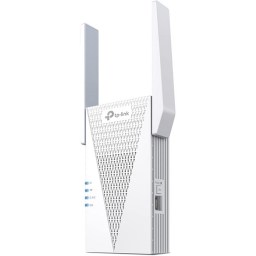
TP-Link AX3000 Wi-Fi 6 Range Extender
TP-Link
AX3000 Wi-Fi 6 Range Extender
Extended Range
This range extender is easy to set up and boasts extensive WiFi coverage and speeds.
Check Price Check Price

Pros and Cons

PROS
  • It supports speeds as fast as 3 Gbps and various devices to be connected simultaneously without experiencing a decrease in performance.
  • OneMesh compatibility means you can connect it to a system of mesh routers and extenders.
  • Four integrated antennas help wireless signals cover hard-to-reach areas.
CONS
  • Some users report having to restart the unit occasionally due to a dropped connection.
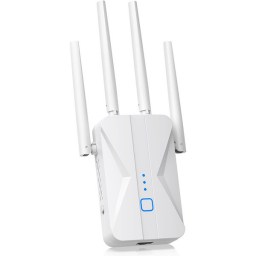
Ingabis AX3000 Wi-Fi 6 Range Extender
Ingabis
AX3000 Wi-Fi 6 Range Extender
High-Performance
This range extender offers impressive performance and Wi-Fi coverage throughout large indoor spaces.
Check Price Check Price

Pros and Cons

PROS
  • It supports dual-band frequencies: 2.4GHz for 600 Mbps and 5GHz for 2,400 Mbps.
  • The coverage zone is extensive, with a maximum range of 13,888 square feet, and the unit can support over 100 devices connected simultaneously.
CONS
  • Some users found it difficult to set up.
TP-Link AC750 WiFi Range Extender
TP-Link
AC750 WiFi Range Extender
Bargain Pick
A simple, inexpensive, and effective solution for fixing spotty WiFi connections in offices and small homes that packs more power than you'd expect for the price.
Check Price Check Price

Pros and Cons

PROS
  • Provides 3,200 square feet of coverage for smaller areas.
  • Affordable.
  • Stable dual-band connection.
  • Simple to set up.
  • It works with all routers, and the companion app makes managing your WiFi network easier.
  • It supports 30 devices connected simultaneously and is compatible with OneMesh technology.
CONS
  • Its compact design only features a single Ethernet port for faster gaming and video streaming.
NETGEAR Wi-Fi Mesh Range Extender EX6400
NETGEAR
Wi-Fi Mesh Range Extender EX6400
Simple Yet Solid
This range booster is fine for most homes or offices that need better signal strength in tricky areas.
Check Price Check Price

Pros and Cons

PROS
  • It has a coverage zone of 2,100 square feet and can connect up to 35 wireless devices simultaneously without a noticeable decrease in internet speeds.
  • It offers internet signal via dual-band frequencies and has an integrated Ethernet port for a fast wired connection.
CONS
  • Some users complain that the WPS function does not work correctly.
ROQRL Wi-Fi Extender Signal Booster, 2025
ROQRL
Wi-Fi Extender Signal Booster, 2025
Most Value
An affordable WiFi range extender with a surprisingly extensive coverage area.
Check Price Check Price

Pros and Cons

PROS
  • It can transfer data as fast as 1,200 Mbps and offers dual-band frequencies for connecting multiple devices.
  • It has a 10,000-square-foot coverage area and offers advanced WPA and WPA2 security protocols to keep your network safe.
  • Plus, it has three operating modes.
CONS
  • This box should be 2-6 lines, or about 15-25 words.
Header Image
Why trust BestReviews?
BestReviews spends thousands of hours researching, analyzing, and testing products to recommend the best picks for most consumers. We only make money if you purchase a product through our links, and all opinions about the products are our own. About BestReviews  
BestReviews spends thousands of hours researching, analyzing, and testing products to recommend the best picks for most consumers. We buy all products with our own funds, and we never accept free products from manufacturers.About BestReviews 
How We Tested

We recommend these products based on an intensive research process that's designed to cut through the noise and find the top products in this space. Guided by experts, we spend hours looking into the factors that matter, to bring you these selections.

First Reviewed
August 25, 2021
76
Models
considered
8
Hours
researched
Category cover

Buying guide for Best Wi-Fi extenders

Kevin Luna
Written by Kevin Luna

Updated March 2025

Ready to buy now? Shop the best: 

If you’re noticing slow internet speeds or experiencing shoddy connections, there could be many reasons for it. You may need to upgrade your internet plan to something that offers faster internet speeds. However, if you’re sure you have an adequate internet plan but still experience slow speeds or unreliable connections, the problem may lie with your wireless router. It may be unable to send a strong wireless signal throughout your home.

One solution is to buy a router that offers broader coverage. But an easier way to solve this problem is to get a Wi-Fi extender. 

A Wi-Fi extender won’t speed up your internet, but it’s essentially an extension of your wireless router. It’ll provide a stronger signal to the devices in your home and let them establish reliable connections so you experience less buffering and lagging when gaming, streaming 4K content and uploading or downloading media.

A Wi-Fi extender looks like a small router and is easy to set up. All you need to do is connect it to a power outlet and run a setup process where you configure it to receive a signal from your wireless router. After that, it’s ready to go, and you can connect your devices directly to the new access point. The best place to put one is in a central location where it will receive a strong signal from a router and provide broad extended coverage.

Our top pick, the Netgear Orbi Outdoor Tri-Band Mesh Satellite Wi-Fi Extender, offers broad coverage, supports fast internet speeds and has an accompanying smartphone app where you can configure settings.

Best Wi-Fi extenders

Netgear AC3000 Mesh Wi-Fi Satellite Extender

This Wi-Fi extender is our top pick for a few key reasons, but primarily because it’s the best choice for coverage in large areas. It extends Wi-Fi coverage by up to 2,500 square feet, and Tri-Band mech technology provides blazing-fast internet speeds. 

It offers wall-to-wall and floor-to-floor coverage, and it has an IP66 protection rating, making it highly weather-resistant with a temperature range of -20 to 50 degrees. Plus, the Orbi app makes it easy to set up, tweak settings, set up parental controls and check internet speed.

Cryo360 Wi-Fi Extender Signal Booster 

If you only need to slightly boost the Wi-Fi signal in your home to get a more reliable connection, this Wi-Fi extender is an excellent choice. It’s one of the more affordable options on our list, but that doesn’t mean it doesn’t get the job done. It can boost coverage by up to 74% and offers five modes, each optimized for specific usage. 

For example, one mode allows it to operate as an access point; another lets you use it as a secondary router. It has a Wi-Fi Protected button, an Ethernet port, a security encryption module and LEDs that indicate its status.

TP-Link AC2600 Wi-Fi Extender

Those looking for a mid-tier Wi-Fi extender to speed up 4K streaming or gaming will be impressed with this unit. It has a quad-antenna design for broad coverage, and Mu-Mimo Wave 2 technology allows for equal communication to connected devices. It has a gigabit Ethernet port for a fast wired connection, and Beamforming technology provides a stronger connection to all connected devices. 

LED indicators light up red when the signal is weak and blue when it’s strong, and the TP-Link Tether app makes it easy to manage settings, grant guest privileges and monitor firmware updates.

Google Nest Wi-Fi

The Google Nest Wi-Fi extender provides broad coverage in small and medium-sized spaces. It offers equal connection speeds to devices in separate rooms. For example, if you’re streaming 4K content in one room, you won’t experience buffering or lagging if you start a FaceTime call from a device in a different room. 

Built-in parental controls, an advanced security chip to prevent cyber attacks and two Ethernet ports for reliable, wired connections round out the list of offerings. Plus, you can create a guest network for password sharing, and it automatically updates itself to stay in optimal condition.

Linksys AX1800 Wi-Fi Extender

Wi-Fi 6 is all the rage these days, and we can’t blame anyone who wants it in their home, as Wi-Fi 6 technology is considerably faster than Wi-Fi 5. This Wi-Fi extender supports Wi-Fi 6 speeds and offers dual-band streaming with up to 2,000 square feet of coverage. 

The push button makes it easy to hook it up to a router or connect devices to your network. It’s compatible with any router, and Beamforming technology establishes and maintains strong connections with wireless devices. Plus, you can manage settings and check internet speeds on the Linksys smartphone app.

TP-Link AX1500 Wi-Fi Extender

This Wi-Fi extender is terrific for small and medium-sized homes and supports Wi-Fi 6 internet speeds. It has high-gain antennas that effectively eliminate dead spots, and Wi-Fi speeds can reach up to 1.5 gigabits per second on the 5-gigahertz channel and up to 300 megabits per second on the 2.4-gigahertz channel. 

The auto-detect feature lets compatible devices connect to the strongest channel based on signal strength and speed. Also, it’s compatible with most other routers and range extenders, allowing you to create a mesh system for a secure network setup, and it has a high-performance tri-core processor.

D-Link AC1750 Wi-Fi Range Extender

One of the more affordable Wi-Fi extenders on our list, this D-Link unit is a fine choice for most users. It offers dual-band connectivity and features a high-speed gigabit Ethernet port to get a wired connection to a device such as a streaming device, computer or gaming console. 

A feature not found on many other Wi-Fi extenders is the D-Link’s smart signal indicator, which lets you know the best place to set it up for optimal signal strength and coverage. It has an integrated wizard for quick setup, and you can download the smartphone app to adjust settings and monitor internet speed and usage.

What to consider before buying a Wi-Fi extender

Coverage

The point of a Wi-Fi extender is to get broader internet coverage. As such, you’ll want to make sure it effectively covers the area where you’ve been having trouble establishing a stable connection. 

For a small or medium-sized home, you can get by with a Wi-Fi extender that offers up to 2,500 square feet of coverage. An extender that offers anything more than that is suitable for larger homes as well as outdoor use.

Dual-band connectivity

The best Wi-Fi extenders emit two wireless signals on different channels: a 2.4-gigahertz channel and a 5-gigahertz channel. The 5-gigahertz channel offers the fastest internet speeds and most reliable connections, but the signal strength isn’t always the strongest. More extensive are 2.4-channel signals, so an extender with dual-band connectivity gives you the flexibility to connect your wireless devices to either channel and can be based on which one provides the better connection.

Internet speed

Wi-Fi 6 is the latest wireless internet technology and provides the fastest speeds. Wi-Fi extenders synced with routers supporting Wi-Fi 6 provide the fastest speeds, but it’s important to be aware that not all devices support Wi-Fi 6 connections.

Setup and configuration

It may seem a bit daunting to integrate a Wi-Fi extender into an existing local area network, but luckily, most Wi-Fi extenders are easy to install. The best ones require you to plug them into a wall and download the appropriate app to your phone, where you can sync it to your wireless router. These apps often allow you to configure various settings, including privacy, security and guest sharing. Also, some have Wi-Fi Protected Setup buttons that make it easy to connect your wireless devices to the new access point.

Status indicator

If you’re unsure where your Wi-Fi extender will be most effective, it’s best to get one with a status indicator that lets you know how strong the connection is to your base router. Some will flash green or blue when the connection is strong and red when the signal is weak. That way, you’ll know where to place your Wi-Fi extender for the best results.

FAQ

Q. How much does a Wi-Fi extender cost?

A. The price of a Wi-Fi extender depends on its features. For example, extenders that support Wi-Fi 6 and offer extensive coverage are typically more expensive and can cost anywhere from $100 to $250. However, a standard extender for casual users can be much cheaper, costing between $30 and $100.

Q. How can I check my internet speed?

A. Most Wi-Fi extenders let you monitor your internet speed and usage through a smartphone app. However, if you get an extender without this feature, you can find free internet speed tests through a simple Google search.

Q. Is it necessary to get a Wi-Fi extender that’s the same brand as my wireless router?

A. No. However, in some cases, setup and configuration can be more manageable and accessible if your router and extender are made by the same company.
 

Our Top Picks